Chess Bitboards
Chess Programming: Diving into Bit Manipulation
Chess programming is a hobby I have pursued for some time now. I have implemented a PGN parser with recursive variation support and a chess modeler that loads the game and validates moves. I attempted to create a chess engine, but I don’t think it went very well. I always opted for the most comprehensible approach rather than the most efficient one. Now, for a change, I’m going to dive into the world of bit manipulation to understand the mechanics of hardcore chess programming.
A Recap
The straightforward approach to chess programming involves modeling the pieces, the board, and the squares. One common method is to keep an 8x8 matrix to represent the board, where pieces occupy specific spaces. When computing the moves for a piece, you would iterate from the piece's position on the board through each of the squares and generate possible moves. This process requires significant computational power, and no serious engine can remain competitive with such an implementation. Search depth is critical in classical chess engines; you need fast move generation and validation to search deeply.
Introducing Bitboards
The first concept to tackle is the bitboard. As the name suggests, a bitboard is a string of bits representing the board. Since a chessboard has 64 squares, and an Int64 has 64 bits—one for each square—this mapping works perfectly. The idea is to assign a bitboard to each piece of each color and set the corresponding bits in the Int64 that reflect the position of that piece on the board. Here’s an example:
0000_0000 | 0000_0000 | 0000_0000 | 0000_0000 | 0000_0000 | 0000_0000 | 0000_0000 | 0000_0000
In this 64-bit number, the least significant bit (LSB) is the square a1. The next bit to the left represents b1, and so on. If this were a white king bitboard and the king were in its starting position, it would look like this:
0000_0000 | 0000_0000 | 0000_0000 | 0000_0000 | 0000_0000 | 0000_0000 | 0000_0000 | 0001_0000
The king is on e1. The advantage of working with bitboards is that you can use the bitwise OR operation to create masks. For example, if you OR all the black piece bitboards together, you create a mask that marks all the squares occupied by black pieces. If you OR every bitboard, you get the occupancy bitboard, indicating all the occupied squares.
Since my implementation is in Swift, it’s important to note that not all languages provide the utilities that Swift does, but the concepts remain the same.
Creating a Square Abstraction
To start, it’s helpful to have an abstraction for a Square. Even though we won’t use a Square object for storage, we still need to compute the index of a bit in the bitboard that corresponds to the file and rank of a square. It’s also useful to have utility functions, such as creating a bitmask for the square, which is a 64-bit number with only the bit corresponding to that square set.
Next, a Bitboard class serves as a nice abstraction. Since this is just a UInt64, I prefer to typealias it and create utility methods in an extension to set and clear bits and define masks for ranks and files. Getting the set bits as Square objects is also convenient. Here are some useful masks for selecting files and ranks:
public static let rank1Mask: UInt64 = 0x00000000000000FF
public static let rank8Mask: UInt64 = 0xFF00000000000000

public static let fileAMask: UInt64 = 0x0101010101010101
public static let fileHMask: UInt64 = 0x8080808080808080
The rank1Mask has 1's on the first rank from A to H, while the fileAMask has 1's on the first file from 1 to 8. These masks come in handy for checking borders or selecting a specific rank or file to work with.
Tricky Methods Explained
Here’s one tricky method I want to explain: getting the squares for the set bits in the board.
var positions = [Int]()
var num = self

while num != 0 {
    let bitPosition = num.trailingZeroBitCount
    positions.append(bitPosition)
    num &= num - 1 // Remove the lowest set bit
}

return positions.map { Square[$0 / 8, $0 % 8] }
This method scans the board from a1 to h1, then a2 to h2, and so on. We find the lowest set bit by counting the number of trailing zeros after that bit. We save this position for later and clear that bit. How does this work? The expression x - 1 sets the lowest bit from x to zero and also sets all the trailing zeros to 1. For example:
  1000_1000 = x
  0000_0001 = 1
Since we can’t subtract 1 from 0, we need to borrow from the lowest set bit, changing x to:
  1000_0111 = x
  0000_0001 = 1
We clear the lowest set bit, but in the process, we set the bits to the left of it. Now we can subtract:
  1000_0111 = x
  0000_0001 = 1
--------------- (-)
  1000_0110
Next, if we AND it with the original number:
  1000_1000 = x
  1000_0110 = x - 1
--------------- (&)
  1000_0000
This cancels out the unwanted set bits and records the position. The next position is again the lowest set bit. This process continues until we reach zero, and the positions array contains the positions that were set. There are other ways to achieve this as well; for instance, you could keep a counter that increments when the last bit is zero and add the counter to the list if it’s 1, rotating the number right until it reaches zero.
Printing the bitboard in an 8x8 format is also helpful for visualization. This is straightforward with Swift, as it allows printing a binary string. You can split that string into chunks of 8 for display.
This is all for today. I plan to write about computing moves for the King and Knight pieces next, followed by how to compute moves for sliding pieces.
Now that we've covered the basics of bitboards, it's time to take a look at our model from a higher level. The objects we need to model the game include at least a board and pieces. While the engine that powers our moves and tracks piece positions will be the bitboards, there are other features we need, such as setting up the board using a FEN or retrieving the FEN representation. Below are some of the key functions I believe are useful:
occupancy(color: Color) -> BitBoard
This method returns a bitboard with all the bits set for the pieces of the specified color. This is particularly useful when computing moves, as you need to check for captures. The implementation is straightforward: you simply perform a bitwise OR on all the bitboards for the given side.
if color == .white {
  return whitePawnBoard | whiteRookBoard | whiteKnightBoard ...
}
You can also perform a bitwise OR on the result of both colors to get all the occupied squares on the board. From this, you can easily deduce the empty squares.
subscript(square: Square) -> (PieceType, Color)?
This method helps determine which piece, if any, is occupying a particular square on the board. I use a dictionary that holds references to each bitboard, keyed by the piece type and color. It’s crucial to use references because bitboards are integers, and if they are properties of the board class, the dictionary should point to these bitboards rather than hold separate copies.
Fetching the actual piece is then just a matter of performing a bitwise AND operation between the board for that piece and color, and the mask of the square. If the result is non-zero, then that’s the piece occupying the square.
possibleMoves(from: Square) -> BitBoard?
This method returns all the possible moves that a piece on the specified square can make, if any. The computation of moves for each piece using bitboards is a topic I'll cover in a future post.
isAttacked(square: Square, by color: Color) -> Bool
This method will be frequently used, especially since you cannot castle through a check or leave your king in check. The basic idea is to retrieve all the bitboards for a given color, iterate through the set bits (representing the pieces on the board), and, for each square, determine the type of piece. You can then request the attacking moves for that piece. To check if the attack bitboard includes the specified square, you perform a bitwise AND operation.
for board in whiteBoards {
  for square in board.squares {
    let (type, color) = self[square]
    let moves = type.attacks(from: square, color: color)
    if moves & square.mask != 0 { return true }
  }
  ...
}
Now, let's take a closer look at the heart of the problem in most chess libraries or engines: move generation. This is an integral part of the system that is called over and over again, so it's worth investing time in optimizing it as much as possible. Hardcore chess engines often optimize this down to the single assembly instruction level to squeeze out maximum performance.
I want to split move generation into two main categories:
- Sliding piece moves
- Non-sliding (static) piece moves
The reason for this differentiation is that non-sliding piece moves can be easily defined using hardcoded lookup tables, without needing to consider blocking pieces. Since static pieces are easier to understand and model, let's start with those. Pawns, knights, and kings are the non-sliding pieces. Pawns and kings have special cases, such as double moves, castling, and en passant captures, but knights are relatively straightforward. You can simply create a lookup table that returns all the possible squares for a knight to jump to from a given square as a bitboard. While it's a bit tedious to do this manually, you can write a small Python script to generate the lookup dictionary and then copy/paste it into your code. Next, get the occupancy bitboard for friendly pieces and apply a bitwise AND operation with the complement of the friendly piece bitboard. This will give you the pseudo-legal moves.
let possibleMoves = AttackTable[.b1]
let friends = board.occupancy(color: .white)
let legalMoves = possibleMoves & ~friends
You can also use the enemy bitboard to calculate captures.
It's similar for the king. Precompute a lookup table for each square containing all the possible moves for the king. The only thing to watch out for is that the king shouldn't "wrap" around the board’s edges to the opposite files or ranks. While it's possible to compute these squares on the fly, I think it's worth the extra memory overhead to use a lookup table since it's faster. Again, performing a bitwise AND with the friendly occupancy board will give you the pseudo-legal squares for the king. These moves are pseudo-legal because you can't move into check, but that will be handled separately during move validation. We'll generate candidate moves and prune them later, which simplifies things significantly. The king has a special case for castling, which also needs to be handled. Castling requires tracking castling rights, which means the king and the rook involved in the castling must not have moved. These rights are tracked by some other entity (like a Board class), which clears them based on the player's move. The other rule is that you can't castle through or into check. This rule will be enforced during move pruning, so we just need to ensure the castling path isn’t under attack.
if board.canCastle(color: color, direction: .short),
   board.isEmpty(square: shortCastlePath),
   board.isEmpty(square: shortCastleHome),
   !board.isAttacked(square: shortCastlePath, by: color.opposite)
{
   // Set the bit for the short castling target square in the bitboard
}
Pawns are the last non-sliding pieces. I want to consider pawn moves and captures separately. For pawn moves, we need to check if the square in front of the pawn is blocked. This is simple because we don't have to worry about pawns "falling off" the ranks, as pawns can't be on the first or last ranks (where they would be promoted). To compute a pawn move, create a mask from the pawn's source square and shift it left (or right, for black) by 8 bits. This shift corresponds to the square directly in front of the pawn. If this square is unoccupied (as tested using the occupancy board), we can mark it as a potential move in the result bitboard.
let friends = board.occupancy(for: color)
let enemies = board.occupancy(for: color.opposite)
let occupied = friends | enemies
let north = from.mask << 8
if north & occupied == 0 {
   // Square is empty
}
Pawns are allowed to move two squares on their first move. Since we can detect if the square in front of the pawn is empty, we just need to check that the pawn is on its home rank and that the double-move target square is also empty.
public static let rank2Mask: UInt64 = 0x000000000000FF00
public static let rank7Mask: UInt64 = 0x00FF000000000000
Using these masks, a bitwise AND operation on the pawn's source square will tell us if the pawn is on its home rank. Then we simply test the occupied board against a mask shifted by 16 bits left or right.
For regular pawn attacks, we check each diagonal (NW, NE) from the pawn. This can be done with a mask shifted left or right by 9 or 7 bits from the pawn’s source square. If this seems confusing, here’s an illustration:
... 00000000_00000010
Assume the bits above represent the 1st and 2nd ranks. (I know you can't have a pawn on the 1st rank, but for the sake of this example, let's place one there.) Since our bitboard representation is little-endian (with the least significant bit on the left), the bitboard above represents a pawn on b1. If you shift this bitboard left by 8 places, you get this:
... 00000010_00000000
Which corresponds to b2. If you shift it left by 7, you get:
... 00000001_00000000
Which corresponds to a2. Once we have the capture masks, we just need to test them against the enemy bitboard:
if from.mask << 7 & enemies != 0 {
   result |= northEastSquareMask
}
// The same applies for the mask shifted by 9 bits.
What happens if the pawn is on the A file and you shift it by 9? The capture will wrap around to the H file on the next rank, which is undesirable. To discard these types of wrap-around errors, we will mask the result with a rank mask. A rank mask is basically a pattern with all the bits of a rank set and the rest of the bits are 0. When we bitwise and this mask with the bitboard it will clear out any bits that are not on the rank. We need to adjust this mask to have all the bits on the capture rank set to 1.
We also need to handle en passant captures. The en passant opportunity is tracked by another entity in the system (like castling rights), and it lets us know which square presents an en passant opportunity. The specific rules for en passant will be addressed during move validation, but for move generation, it's enough to check whether the en passant square is one of the capture masks we created earlier. If they match, we can include the en passant square in the result.
That covers non-sliding piece move generation. Next, we'll look at sliding piece moves and how bitboards remove the need to loop over squares to compute attack vectors using binary arithmetic.
Now it's time to generate moves for sliding pieces: rooks, bishops and queens. I think this is one of the most ingenious ways of using bit manipulation. The idea is the following: Given a board with the square a sliding piece is on set how can we get all the attacks for that piece as a bitboard? Let's just assume we are computing this for a rook to make things easy. If the board was empty it would be pretty simple: Just come up with a mask that would set all the bits on the the rank for the piece and a mask that would set all the bits on the file. But the problem is that we can have a piece in our way that is blocking further movement for the piece. So consider the following board
00000000 8
00000000 7
00000000 6
00000000 5
00000000 4
00001000 3
00000000 2
00000000 1
If we were generating the horizontal moves for the rook and the rank was empty we would end up with
00000000 8
00000000 7
00000000 6
00000000 5
00000000 4
11110111 3
00000000 2
00000000 1
In this resulting board all the 1s indicate a square that is a valid move, so we cleared the origin square for the rook.
But let's assume there is a friendly piece 3 squares to our left:
00000000 8
00000000 7
00000000 6
00000000 5
00000000 4
01001000 3
00000000 2
00000000 1
In this case our resulting bit board would be:
00000000 8
00000000 7
00000000 6
00000000 5
00000000 4
00110111 3
00000000 2
00000000 1
Since we cannot capture a friendly piece we would need to clear the position for that piece and any squares after that piece to the left. It's possible to come up with a bunch of rules like that implement them in an imperative manner but that would be a just a little bit more efficient than implementing a squares based algorithm and not worth all the weird bit masks. There is another method to compute the attack vector that exploits the properties of binary subtraction. To understand how this work let's first take a look at binary subtraction:
 100000110
-000000010
----------
 100000100
This is a straight forward case where there is no borrowing involved. But if you need to borrow then we borrow from the next bit that is a 1 to our left and that borrowing propagates through all the bits up to our location.
 100000110
-000001000
----------
(borrow from MSB)

 011110110
-000001000
----------
 011111110
How did I get a 1 after subtracting 1 from 0 on the 4 bit from the right? Well remember we borrowed to that 0 actual became a 10 in binary, and 10 - 1 = 1.
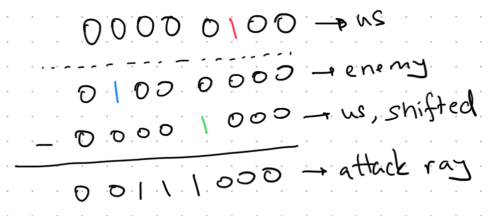
The thing to notice here is how that borrow operation from the left bit sets all the bits upto the location we are subtracting from. This is exactly what we need to cast an attack ray. Using this in bitboards is called the o ^ (o - 2r) trick. It works like this:
You get the occupied board (this is the o part) and then shift the position of the piece you need to calculate for to the left (this is the 2r part). Then you subtract the 2r from the o. This will propagate the borrowed bit all the way to the location of the piece we are calculating for. Let's apply this to the rook example above (I'm just showing rank 3)
01001000 3
So our piece is on bit 4 and the friendly piece is on bit 7. Let's write these out seperately:
01000000 3 (friendly)
00001000 3 (piece)
Why do we need to shift to the left? If we don't we'll just be clearing out our piece location and it would not get us anything.
01000000 3 (friendly)
00010000 3 (piece, shifted)
After we shift and subtract
01000000 3 (friendly)
00010000 3 (piece, shifted)
--------
00110000 (attack vector)
Our attack vector shows that we can attack 2 squares to the left. This trick only works towards the left of the bits as we need subtraction. To compute the attack in the other direction we just need to mirror the bitboard and run the same operation. Then we can combine the results from these, mask for the rank, file or diagonal we are interested in and return. This will automatically work for files, ranks and diagonals.
Here is another example:
Now that all the basic building blocks have been covered by the previous posts, it would be useful to take a step back and think about how all of this works together, especially regarding the edge cases of some of the special rules of chess.
Starting with a PGN parser is a good way to dive into this. Our goal is to import a chess game from a PGN file and be able to walk through the moves in the main line. But we also want to validate that all the moves in the PGN file are correct and valid. Parsing the PGN into a syntax tree is a problem of its own, which I cover in PGN Parser.
Assuming we have tokenized all the text and parsed it into some structure, we can traverse the nodes in this structure. When we encounter a move node, we can create a Move object from it and pass it to the board for execution. If it is a valid move, we'll append it to the list of moves in the main line. There are two points to consider here:
- Creating a move object from the SAN (Standard Algebraic Notation) representation of a move.
- Executing the move on the board.
The first point is interesting because SAN notation does not mention coordinates but only the piece type (implicitly for pawns). To actually make a move, we need the source square of that piece. So, when creating a move from SAN notation, we need to pass in the current state of the board. It’s also helpful for the move object to contain additional information, such as the color of the piece and its type, as well as whether this move was a promotion or a capture. Here’s the information I tracked in my implementation:
init(
    from: Square,
    to: Square,
    color: Color,
    pieceType: PieceType,
    capturedPieceType: PieceType? = nil,
    promotion: PieceType? = nil
) {
...
}
When decoding SAN notation, the idea is to handle castling separately, as the source, target, and piece are known. Then, check for special characters like "=", "x" that denote promotion and capture, and store these as we’ll pass them to the Move object initializer later. Next, check if it's a pawn move by looking at the first character—other piece moves always start with an uppercase letter. The remaining part contains the target square for the move. You also need to account for tricky cases like promotion captures (e.g., dxc8=Q, which means that the pawn on the D file captures something on c8 and promotes to a queen).
The final missing piece is the origin square. To find this, you need to get the bitboard for the piece type you’re checking and iterate through it to find possible movement squares. When iterating through all possible moves, if any of them match the square extracted from SAN, we then need to make sure it’s a legal move (e.g., not leaving the king in check). If the move is legal, we append it to a list of candidate origin squares.
Why a list? It’s possible for two pieces of the same type to move to the same target square (e.g., two rooks on A and H files moving to c1). In this case, SAN notation, like Rc1, must be disambiguated. At the end of the loop, consider the following cases:
- There are 0 origin squares.
- There is exactly 1 origin square.
- There are more than 1 origin squares.
For case 0, either the PGN is invalid or there’s a bug in our code. In case 1, we can use the square. For case 2, we need to further process the SAN to disambiguate the piece’s origin square. The SAN notation will contain file or rank information after the piece name, which we can parse to filter our candidate origin squares. The SAN can also contain both rank and file information simultaneously, but I haven’t encountered that yet. With this, we have all the information required to create and validate a Move object from the SAN, which we can then send to the board for execution.
In the execution function, additional validation is necessary, such as:
- Is the correct side moving?
- Are they trying to move an opponent’s piece?
- Are they trying to castle illegally?
- Are they even trying to move a piece?
- Is the move within the possible legal moves for that piece?
Remember, we are receiving an arbitrary Move object that could have any origin and target squares, so we need to rigorously validate the move. Once validations pass, we force the move, even if it would leave the player in check, and then check if it does. If the move leaves the king in check, we undo it and return an error, as the move is illegal.
If the move is a castling move, we update castling rights. We also need to check if the move would allow an en passant capture next turn. En passant occurs when a pawn makes a double move and lands adjacent to an enemy pawn, which may capture to the square behind the pawn. If the double move results in a check or capturing en passant would leave the king exposed (e.g., the pawn is pinned), the en passant square cannot be set. Processing 100K games taught me all these en passant rules :)
Next, we update the move counters, and the execute function is almost complete.
In the force move function (called within execute), I maintain the threefold repetition counters. This is essentially a dictionary of the board's hash and an integer that tracks how many times the position has occurred. The board hash is a Zobrist rolling hash containing piece locations, castling rights, the en passant square, and which side is to move. You also need to push the current move to a stack so that it can be undone if necessary.
Adjust the bitboards for the piece that moved: remove the bit for the origin square and set the bit for the target square. If there’s a capture, also adjust the bitboard for the captured piece and clear its bit. For a promotion, adjust both the source piece and the new promoted piece’s bitboard. For castling, adjust castling rights, and if the move involves a king or rook, or a rook is captured, reset castling rights accordingly. Finally, set the side to move to the opponent’s color, and you’re done.
There are many edge cases and intricacies when implementing chess rules. A great way to test your implementation is to compare the board FENs with those generated by another parser. I downloaded a Lichess PGN database with millions of games and ran the first 100K through pgn-extract to add the FEN after each move as a comment. Then, I put together a small Python script to read the PGN file and output a CSV with the columns:
before_fen,san,after_fen
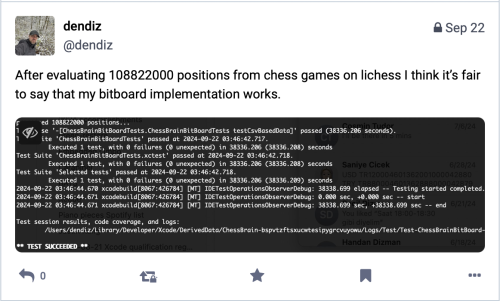
In my test cases, I would load the PGN, compare the board’s FEN to the CSV file, make the move, and compare the resulting FEN to the CSV. I processed around 108 million moves from these games as tests, encountering all sorts of edge cases.